Honda Lawn Mower Cutting Problems: Uneven Cuts, Bagging and Blade Faults
Honda lawn mower cutting problems usually come from a dull or damaged blade, packed grass under the deck, uneven height settings, wet turf, or blocked airflow. A safe inspection, a clean deck, the right blade height, and a sharp model-matched blade fix most poor-cutting complaints.
Are clumps of grass left behind even after two passes? Does the mower scalp one side of the lawn, leave a ragged edge, or refuse to fill the bag? Those symptoms feel like separate headaches, but they often point to one small issue hiding under the deck.
I once rushed through a mowing job with a blade that looked “good enough.” The mower left fuzzy strips along the fence, and I spent more time recutting the yard than the blade inspection would have taken. That’s a common mistake, not a dumb one.
I wrote this guide for Honda owners who want a clean cut without guessing at every lever, cable, and bolt. You’ll get a practical way to sort blade faults from deck problems, bagging trouble, drive issues, and engine symptoms.
Get the diagnosis right, and you can save a trip to a repair shop, avoid buying the wrong blade, and stop shredding healthy grass. Skip the basics, and the mower may keep vibrating, clogging, scalping the lawn, or wearing out parts that were never the real problem.
This takes about 12 minutes to read, and you’ll learn how to:
- Match each cutting symptom to its most likely cause.
- Inspect the blade, deck, wheels, discharge path, and bagging system safely.
- Set mowing height and speed for a cleaner, more even finish.
- Decide when a replacement blade or professional repair makes sense.
Honda Lawn Mower Cutting Problems: the Complete Fix
Honda lawn mower cutting problems are usually solved by checking the blade, deck, height adjustment, mowing conditions, and grass discharge in that order. A mower that leaves a strip on one side needs a different check from a mower that vibrates or throws wet clumps.
Before touching the underside, remove the spark plug wire from a gas model and keep the wire away from the plug. On a battery model, remove the battery pack or follow the manual’s blade-service procedure, then wait until every moving part has stopped.
Start with the simple checks:
- Park the mower on a firm, level surface.
- Turn off the engine and disconnect the ignition source.
- Check tire pressure or wheel condition.
- Inspect the cutting height on every wheel.
- Clean packed grass from the deck and discharge opening.
- Remove and inspect the blade.
- Sharpen or replace the blade if the edge is rounded, bent, cracked, or heavily nicked.
- Reassemble the blade with the correct orientation and tight fastener.
- Test the mower on a small, dry patch of grass.
A cutting deck is the metal housing around the blade. Grass, damp soil, and leaves can collect inside the deck and change the way clippings move, so even a sharp blade may leave piles behind.
Your mowing pattern matters, too. Cutting tall grass in one pass forces the engine to slow, reduces blade tip speed, and makes the discharge opening clog. Set the mower high enough for the first pass, then lower the height slightly only if the grass still needs a shorter finish.
| Symptom | Likely cause | First useful check |
|---|---|---|
| Uneven height across the lawn | Uneven wheel settings, low tire, bent deck, or damaged blade | Compare all wheel positions and inspect the blade |
| Ragged or brown-looking grass tips | Dull, bent, or incorrectly installed blade | Remove and inspect the blade edge |
| Grass left in rows | Wet turf, clogged deck, full bag, or weak airflow | Clean the deck and mow when grass is dry |
| Strong vibration | Bent blade, loose blade bolt, damaged adapter, or spindle issue | Disconnect power and inspect blade mounting |
| Blade won’t engage | Roto-Stop control, cable, belt, or clutch fault | Stop testing and inspect the control system |
| Mower scalps one side | Wheel height mismatch, low tire, or bent deck | Measure wheel settings and check the deck |
| Bag fills only partly | Blocked chute, wrong bag, full bag, or low blade speed | Empty and clean the bag and discharge path |
A mower that suddenly cuts poorly after hitting a root, sprinkler head, or hidden stone deserves extra caution. The impact can bend the blade or blade adapter even when the deck looks fine from above.
The right mowing setup
Cut no more than about one-third of the grass height at one time. If the lawn has grown from 3 inches to 6 inches, raise the deck and make a first pass, then mow again later rather than forcing a short cut in one go.
Mow at a steady walking pace. Pushing quickly through thick grass reduces the time the blade has to lift and cut each blade of grass, which leaves windrows and gives the engine a rough, strained sound.
The best cutting height depends on grass type, season, shade, and moisture. A practical starting point for many cool-season lawns is around 2.5 to 4 inches, while warm-season grass is often kept shorter, but the turf’s condition matters more than chasing one magic number.
Honda’s MicroCut twin-blade system, found on some models, uses stacked or paired blades to improve clipping size and bagging. A wrong blade arrangement, missing blade washer, or incorrect blade type can hurt both cut quality and airflow.
If your mower has a model-specific setup, match the blade length, center-hole pattern, lift profile, and mounting hardware to the model. A blade that physically fits may still have the wrong lift or balance.
- Disconnect the spark plug wire or battery before any underside inspection.
- Check wheel height and deck buildup before blaming the engine.
- A clean, dry lawn and a sharp, correctly installed blade solve many bagging complaints.
- Never keep mowing after a strong impact if vibration starts suddenly.
Finding the Cause of an Uneven or Ragged Cut
An uneven cut usually comes from different wheel heights, a low tire, a bent blade, a damaged deck, or mowing grass that is too wet or tall. The repair starts by deciding whether the problem follows the mower or only appears under certain lawn conditions.
If one side of the deck cuts lower, place the mower on level ground and compare the distance from each deck corner to the pavement. Don’t trust the height lever alone, because a bent linkage or worn wheel bracket can leave two wheels at different real heights.
A blade lift is the raised portion behind the cutting edge that creates airflow under the deck. If the lift is worn down, bent, or installed upside down, the mower may cut but fail to lift grass into the discharge stream.
Is the grass torn instead of sliced? A sharp blade leaves a fairly clean cut, while a dull edge bends and rips the leaf. Ragged tips often turn tan or brown after mowing because damaged tissue loses moisture faster.
The blade doesn’t need to be razor sharp. A firm, even bevel works better than a thin edge that folds over after hitting a small stone. If you sharpen by hand, remove only enough metal to restore the edge and keep both ends similar in weight.
The term blade balance means both ends of the blade weigh close enough that the blade spins without shaking. A blade can have a sharp edge and still cause vibration if one side has been ground much more than the other.
If the mower leaves a narrow strip between passes, check the overlap and the blade arrangement. A narrow uncut strip may come from walking too far apart, a missing blade on a twin-blade deck, or a deck that isn’t level.
The article uneven cut checks covers the height and blade clues that separate a simple adjustment from a bent component. Use that symptom comparison before ordering parts, especially after an impact.
How mowing conditions change the cut
Wet grass sticks to the deck and blocks the discharge path. Even a powerful Honda engine can struggle when the underside turns into a heavy green paste, so wait until the blades are dry and the soil has enough firmness to support the mower.
Tall grass bends away from the blade instead of standing upright for a clean cut. Mow slowly on the first pass, raise the deck, and make the second pass from a different direction if the lawn has grown far beyond its normal height.
A slope can make one side of the deck sit lower. Keep both hands on the handle, mow across a gentle slope when the manual permits it, and avoid steep areas where footing or control could fail.
Blade inspection and replacement
Disconnect the spark plug wire or battery before tipping the mower. Wear gloves while handling the blade, but don’t rely on gloves to protect you from a spinning blade or a sharp edge.
Look for these conditions:
- A curved blade that no longer looks straight from end to end.
- Deep nicks that would require removing a lot of metal.
- Cracks near the center hole or cutting edge.
- A rounded cutting edge that won’t hold a bevel.
- A damaged blade adapter, washer, or mounting bolt.
- Grass packed between the blade and deck.
A blade with a crack should be replaced, not sharpened. A cracked blade can break at operating speed and send metal through the deck opening.
I once found a blade that had been sharpened unevenly by a previous owner, with one end noticeably narrower than the other. The mower shook like a shopping cart with a bad wheel, and balancing the blade fixed more than another round of sharpening ever could.
Honda blade mounting hardware has a correct direction. The cutting edge faces the direction of rotation, while the raised lift usually faces the deck interior, but model designs vary, so confirm the arrangement in the owner’s manual before tightening the fastener.
Use a torque wrench if the manual provides a blade-bolt torque value. A loose bolt can cause vibration or blade slip, while excessive force can damage the crankshaft threads or adapter.
My preference is a model-matched replacement blade rather than a bargain universal blade. The right blade profile protects cut quality and airflow, and the small price difference is easier to swallow than a deck full of clippings.
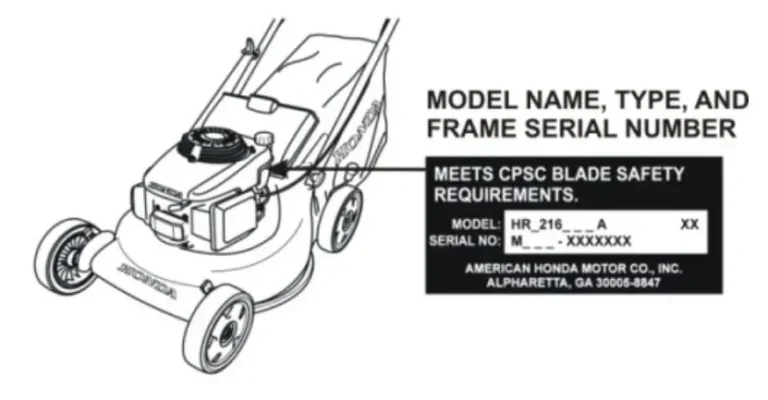
The comparison of model-matched Honda blades can help if the old blade has no readable part number. Match the mower model first, then confirm blade length, center hole, lift design, and any twin-blade arrangement.
Fixing Bagging, Discharge, and Clip Director Trouble
Poor bagging usually comes from blocked airflow, wet or tall grass, a full bag, incorrect blade lift, or a discharge control that isn’t moving fully. The bagging system needs a steady stream of air, not just a fast-spinning blade.
Start with the bag itself. A fabric bag can become coated with fine dust and grass residue, which reduces airflow through the material even when the bag looks empty.
Brush loose debris from the bag and check the frame for bends. Don’t use a bag with torn fabric, a broken frame, or an opening that doesn’t attach securely to the mower.
A full bag changes the airflow path and can make grass spill from the deck. Empty the bag before it is packed tight, especially in damp conditions.
If the mower leaves clippings in a line, stop the engine and inspect the discharge chute. A small wad of wet grass can act like a cork, blocking everything behind it.
Never put your hand into the chute while the blade could move. Disconnect the spark plug wire or battery, wait for the blade to stop, and use a stick or brush to clear packed grass.
Does the bag fill halfway and then stop? Check whether the mower is moving too fast through tall grass, the bag fabric is clogged, or the blade has lost its lift. A slow walking pace and a dry first pass often restore the airflow without a part replacement.
The detailed checks for a mower not picking up grass are useful when the engine sounds normal but clippings remain on the lawn. That symptom points toward airflow, bag fabric, deck buildup, or mowing conditions more often than a fuel problem.
Clip Director and mulch settings
A Clip Director is Honda’s control system on some mowers for changing how clippings are directed, bagged, or returned to the lawn. The control can stick when wet grass dries inside the channel or when debris collects around the door.
Before cleaning the mechanism, disconnect the ignition source and confirm the blade cannot start. Move the control gently through its range, but don’t force a lever that stops suddenly.
Check for:
- Grass packed around the rear door or sliding plate.
- A bent control rod.
- A loose spring or missing retaining clip.
- A door that rubs against the deck.
- Debris blocking the mulch and bagging passages.
- A bag adapter that is not seated correctly.
The repair steps for a stuck Honda Clip Director focus on cleaning and checking movement before replacing parts. A light coating of dried grass can make the control feel broken when the real problem is a blocked track.
Don’t spray heavy oil onto a grass-contact area. Oil collects dust and can create a sticky paste, while a clean, dry sliding surface usually moves better.
When the blade won’t engage or stop
Some Honda mowers use Roto-Stop, a blade-control system that lets the engine keep running while the blade stops. A cable, control lever, clutch, belt, or switch problem can prevent engagement or keep the blade from stopping properly.
If the blade won’t stop when the control is released, shut off the engine immediately and disconnect the spark plug wire after the blade stops. Don’t keep testing the mower near feet, pets, children, or loose clothing.
A blade that won’t engage may have a stretched cable, damaged clutch, broken belt, or control linkage that isn’t reaching its full travel. A blade that stays engaged may have a seized mechanism or a control fault.
The guide to Honda Roto-Stop problems helps separate a control adjustment from a repair that needs a trained technician. A safety-control fault is not a good place for trial-and-error repairs.
Important Tip: Never bypass a blade-control safety system to “test” the mower. If the blade-control behavior is wrong, stop using the mower until the fault is repaired.
Vibration, Noise, and Mechanical Faults
Bad vibration usually means the blade, blade adapter, mounting bolt, spindle, or deck has a mechanical problem. Vibration that begins right after a hard impact deserves more attention than a mild shake that has slowly developed over many seasons.
Disconnect the spark plug wire or battery before examining the blade. A stopped engine doesn’t guarantee a safe blade because some systems can retain movement or restart if the control is disturbed.
Check the blade bolt first. Look for a loose fastener, damaged washer, cracked adapter, or blade that doesn’t sit flat against the mounting surface.
A spindle is the shaft and bearing assembly that supports and spins the blade. Excessive side-to-side movement at the blade can point to spindle wear, which normally calls for repair rather than more sharpening.
The mower can vibrate from a bent blade even if the blade spins freely by hand. Remove the blade and check it against a flat surface, or have a repair shop check runout if the metal doesn’t look straight.
Does the vibration fade when the blade is removed? That strongly points toward the blade, adapter, or mounting hardware, though a professional should check the spindle before the mower goes back into regular service.
The troubleshooting guide for a badly vibrating Honda mower gives the right inspection order for blade and mounting faults. Stop immediately if the deck shakes hard, the handle becomes difficult to hold, or a metallic knock appears.
Engine speed and cutting power
A blade needs enough speed to cut and lift grass. A dirty air filter, stale fuel, a restricted fuel system, or an engine-control fault can make the mower bog down under load.
Don’t adjust the governor spring casually. The governor controls engine speed, and an incorrect adjustment can create an unsafe overspeed condition.
Use fresh fuel that matches the owner’s manual, check the air filter, and inspect the spark plug if the engine lacks power. A mower that runs smoothly with no grass but dies in thick turf may need a basic engine service.
A loose or slipping drive belt can also affect blade speed on certain models. Belt inspection requires the ignition source to be disconnected, and belt routing should match the model diagram.
I wouldn’t keep raising the throttle or pushing harder when the engine bogs down. Slow the walking pace, raise the deck for tall grass, and fix the power loss before the mower turns a minor service issue into a hot, frustrated afternoon.
When professional repair makes sense
A repair shop is the safer choice when the crankshaft looks bent, the spindle has play, the blade-control system fails, the deck is cracked, or the mower continues vibrating after a new balanced blade.
Stop using the mower if you find a crack, fuel leak, smoking belt, damaged electrical wire, or control that won’t return to its safe position. A clean lawn is never worth gambling with a rotating blade.
A small parts cost can grow quickly if a loose blade damages the adapter or crankshaft. That’s why inspection after an impact pays off, even when the mower still starts.
Preventing Honda Lawn Mower Cutting Problems
Regular cleaning, correct mowing height, dry grass, sharp blades, and timely inspections prevent most cutting complaints. A few minutes after mowing is easier than scraping a hard green shell from the deck weeks later.
After each mowing session, disconnect the ignition source and remove loose grass from the deck, wheels, discharge area, and rear door. Let the mower cool before cleaning around the engine and never spray water into air-filter, electrical, or control areas.
Keep the blade sharp enough to slice cleanly. Many homeowners sharpen at the start of the mowing season and inspect again after hitting gravel, roots, or hidden objects, though heavy use may call for more frequent service.
Use a simple maintenance rhythm:
- Check the blade and wheel settings before mowing.
- Clear the deck after mowing wet or tall grass.
- Inspect the bag and chute when bagging gets weak.
- Check the air filter and spark plug according to the model manual.
- Replace damaged hardware instead of straightening questionable parts.
- Store the mower dry, stable, and away from children.
A blade can look acceptable from the top while the cutting edge is rounded underneath. Turn the mower off, disconnect power, and inspect the actual edge rather than judging from the handle.
Don’t mow over sticks, stones, wire, or toys. Walk the area first, because a hidden object can bend a blade in a fraction of a second and turn a clean afternoon into a repair job.
The first troubleshooting step for broad Honda mower symptoms is to match the complaint to a system: cutting, bagging, vibration, engine power, or blade control. That prevents random part swapping and keeps the diagnosis focused.
A clean cut also depends on lawn health. Mowing too short stresses grass, while leaving clippings in thick rows can smother sections of turf. Keep the mower moving at a steady pace and vary the mowing direction so grass isn’t pressed permanently one way.
Pro Tip: Mark the normal wheel-height setting with a small piece of tape on the handle or height lever. You’ll return to a repeatable cut after cleaning, storage, or a wheel adjustment.
If the same cutting fault returns after cleaning and a correct blade replacement, inspect the deck alignment and spindle. Repeating the same fix without checking the mounting system is how a small fault turns into a long-running nuisance.
FAQs About Honda Lawn Mower Cutting Problems
Why is my Honda lawn mower leaving strips of grass?
Honda lawn mowers leave strips when the mowing overlap is too narrow, a blade is missing or damaged, the deck is uneven, or grass is bent by wet conditions. Check wheel height, blade arrangement, deck buildup, and walking speed. A twin-blade model needs both blades installed in the correct positions.
Why is my Honda mower cutting unevenly?
Honda mowers cut unevenly when wheel settings differ, a tire is low, the blade is bent, or the deck has been damaged by an impact. Park the mower on level ground and compare deck height at each corner. Replace a cracked or bent blade instead of trying to straighten it.
Why does my Honda mower leave clumps when bagging?
Honda mowers leave clumps when grass is wet, the bag fabric is clogged, the chute is blocked, or the blade lacks enough lift. Empty and brush the bag, clean the discharge path with the ignition disconnected, and mow more slowly through tall grass.
How often should a Honda mower blade be sharpened?
A Honda mower blade may need sharpening several times during a heavy mowing season, but the right interval depends on lawn size, debris, and mowing frequency. Inspect the edge whenever the cut becomes ragged. Replace the blade if cracks, severe nicks, or a bent profile remain after sharpening.
Can a wrong Honda blade cause poor cutting?
Yes, a wrong Honda blade can cause poor cutting, weak bagging, vibration, or poor mulch performance even when the blade fits the bolt. Blade length, center hole, lift profile, balance, and twin-blade arrangement must match the mower model. Check the model number before buying a replacement.
When should a Honda mower go to a repair shop?
A Honda mower should go to a repair shop when the spindle has side play, the crankshaft appears bent, the deck is cracked, the blade-control system fails, or strong vibration continues after blade inspection. Fuel leaks, damaged wiring, and a blade that won’t stop also call for professional service.
Get A Clean Cut Without Guessing
Honda lawn mower cutting problems usually become manageable once the symptom is tied to the right system. Start with safe power disconnection, then inspect height settings, deck buildup, blade condition, airflow, and control parts in that order.
I’d begin with cleaning and a careful blade check before buying parts. If the mower still vibrates, leaves strips, or refuses to bag after those steps, stop chasing guesses and have the mounting, spindle, deck, or control system checked by a qualified repair professional.